Still seeing ads after subscribing
Troubleshoot the Remove Ads subscription — renewals, confirmation emails, new handsets, and restarts.
If you've paid to remove ads but still see them, work through these.
Has your annual subscription run out?
The subscription lasts one year and then needs renewing. Check the date  on your original confirmation email
  .
.
Did you get a confirmation email from Apple/Google?
Apple or Google emails a purchase confirmation when you remove ads, because payment goes through the store. No email may mean the purchase didn't complete — check whether the payment actually left your account.
Changed your handset?
If you're still within your subscription period, go to More → Restore Purchase and sign in with the same account you bought it with. This reinstates your purchase on the new device.
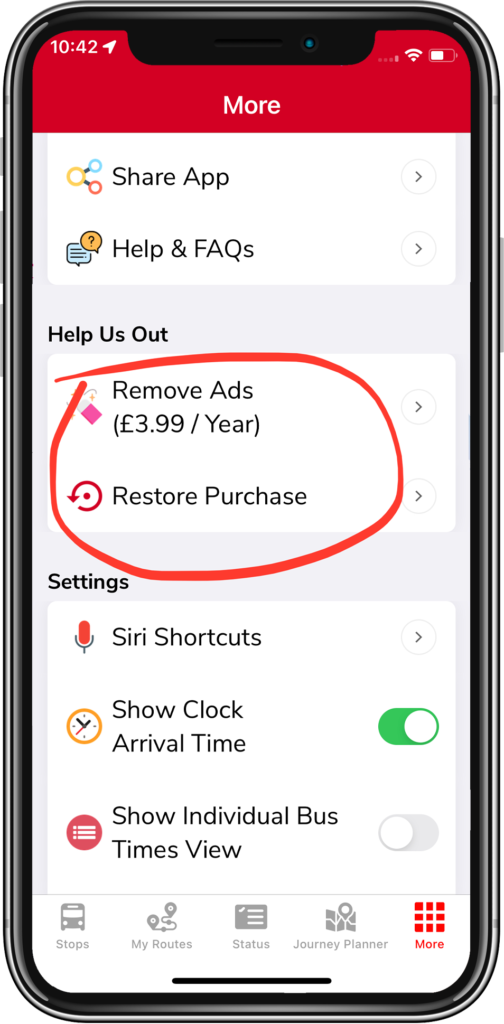
Just purchased but still seeing ads?
Restart the app  for the change to take effect — close it from your device's task switcher, or restart the phone. The ads should be gone afterwards.
Still stuck? Contact us with your confirmation email to hand.
Related articles
Didn’t answer your question?
Contact support